Examples
All the examples are in StateCharts.Examples. Each one is covered by a scenario of the verification suite.
TrafficLight — traffic light
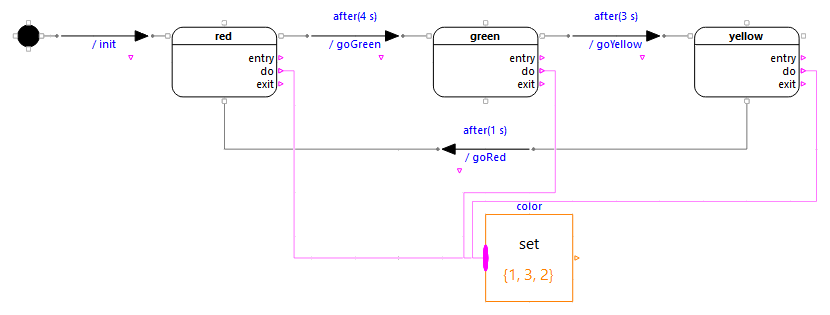
The initial pseudo-state leads to red (4 s), then green (3 s), yellow (1 s), and back to red. The transitions are time events after(delay).
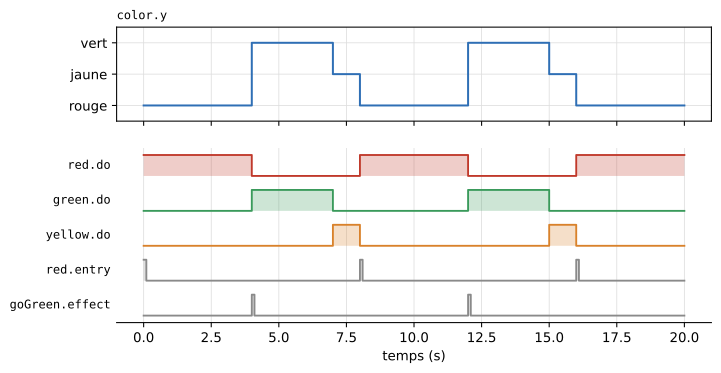
color.y(Actions.SetIntegerblock connected to thedooutputs): 1 = red, 2 = yellow, 3 = green;cycles: number of entries intored, counted on thered.entrypulse. It is 1 from t = 0;green.entry,red.exit,goGreen.effect: 0.1 s pulses at 4 s.
Thermostat — on/off control of a room
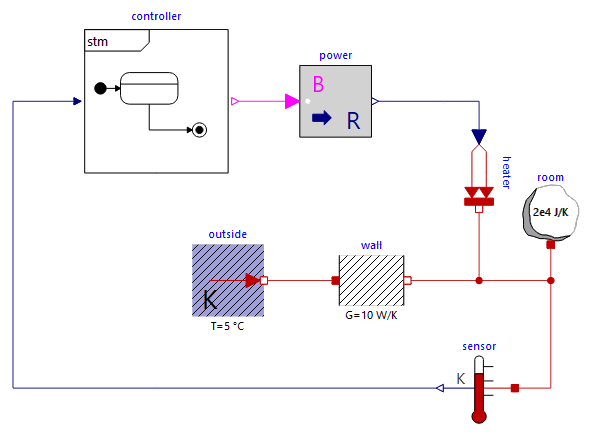
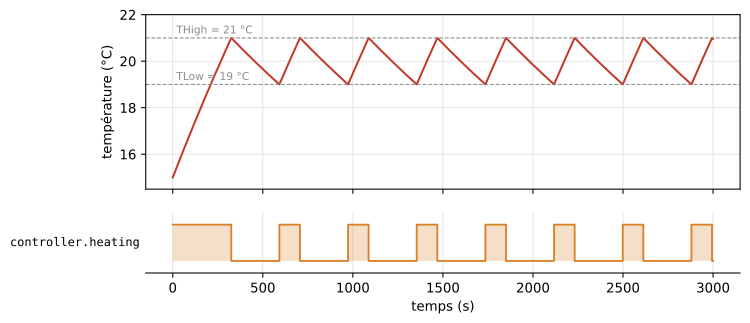
A room (heat capacity, losses to the outside at 5 °C) heated by a 500 W heater. The controller is a state machine used as a block, ThermostatChart (extends StateCharts.Chart): input T, output heating.
off → on: completion transition with the guard[T < TLow](19 °C);on → off: change eventwhen(T > THigh)(21 °C);heatingis thedooutput ofon.

The room starts at 15 °C: the machine enters off and leaves it at once for on, at the same instant. The temperature then oscillates between 19 and 21 °C. To plot: room.T (in °C) and controller.heating; open controller (right-click → Open Class) to see the diagram.
Toggle — push button
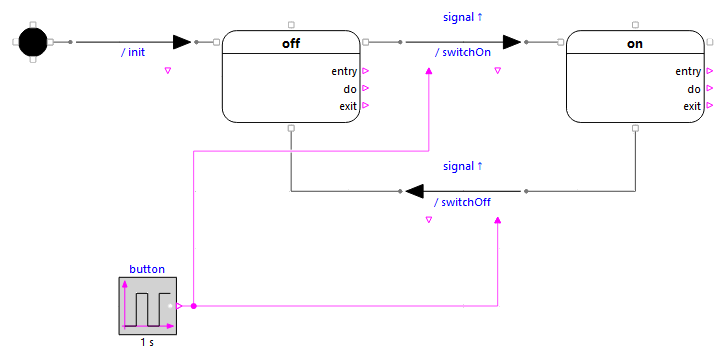
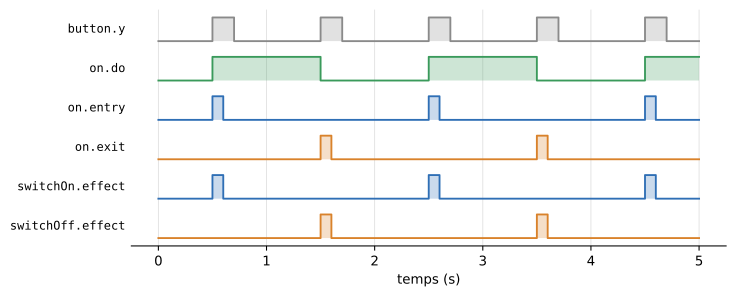
A push button (button, pressed for 0.2 s every second from 0.5 s) switches a lamp on, then off, at each press. Both transitions have a signal trigger: they fire on the rising edge of their signal input, so holding the button down does not switch the lamp back at once.
on.do: the lamp;on.entry,on.exit: pulses when the lamp is switched on and off;switchOn.effect,switchOff.effect: pulses at each firing;presses: number of firings.
Sorting — sorting parts
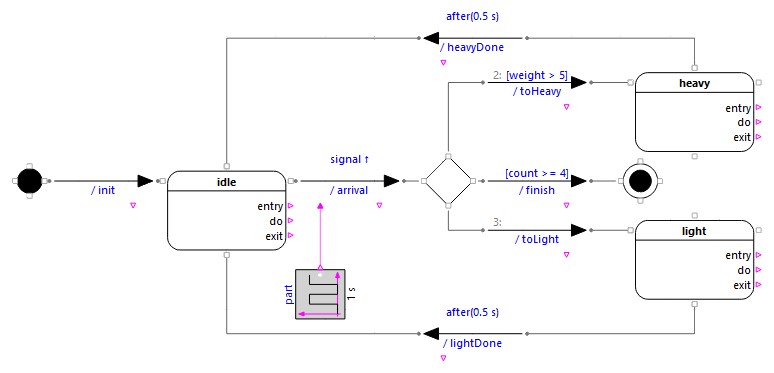
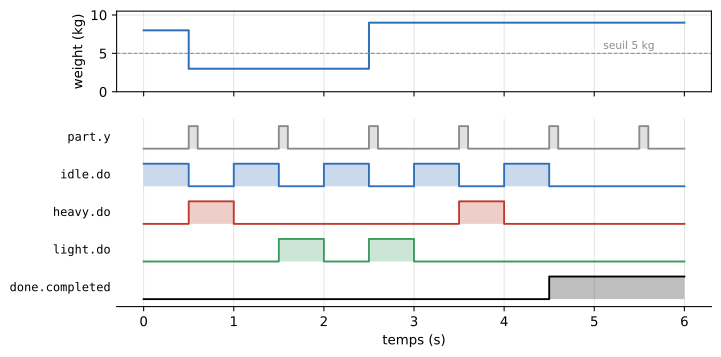
A part arrives every second (signal event on arrival). The choice pseudo-state choice sends it to heavy or light according to its weight, then the machine goes back to idle after 0.5 s (after(0.5 s)). After four parts, the next arrival leads to the final state done.
The three transitions leaving the choice show the priorities: finish [count >= 4] (1), toHeavy [weight > 5] (2), toLight without guard (3: the "else" branch).
AutomaticDoor — automatic door
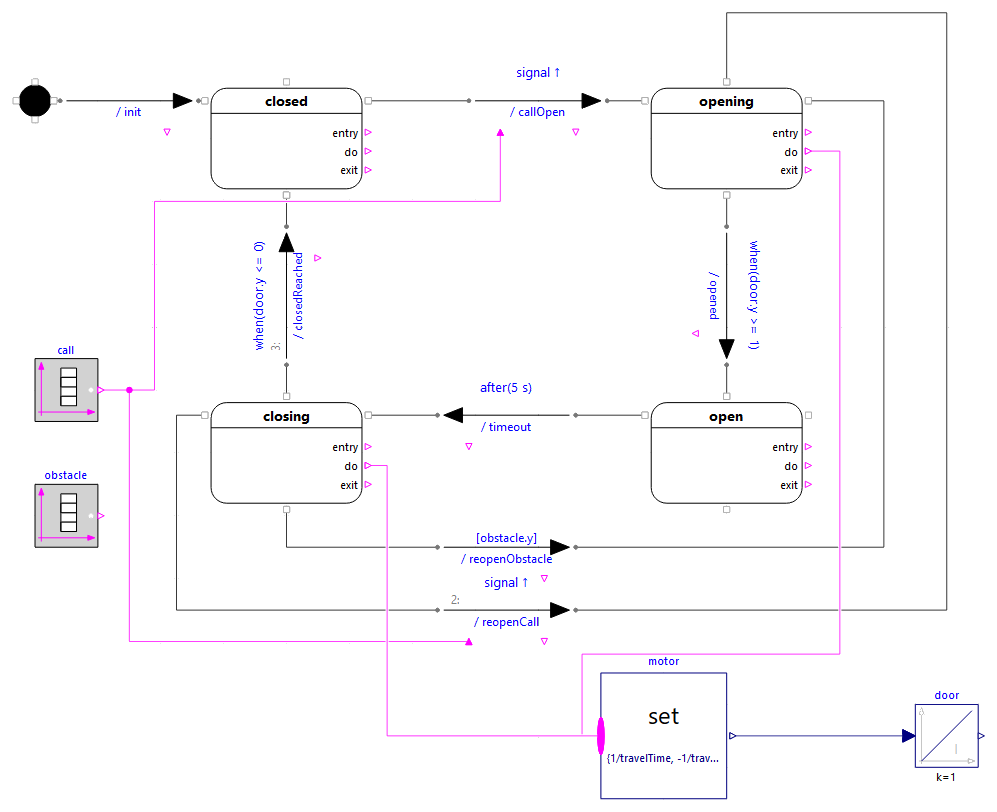
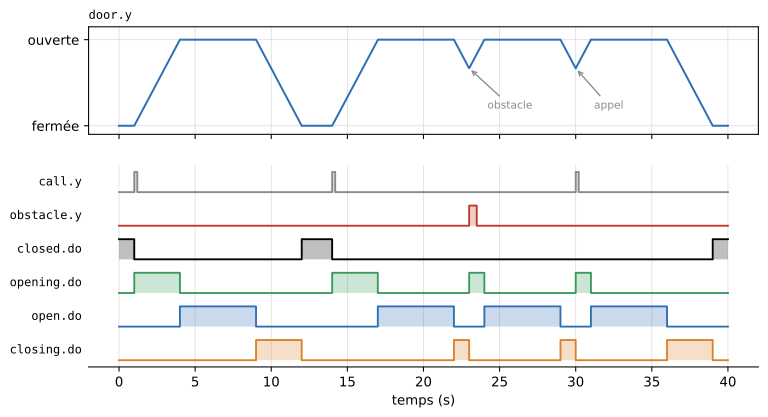
A state with three outgoing transitions. The door opens on a call (closed → opening), moves to open when it is fully open (when(door.y >= 1)), then to closing after 5 s. The position of the door is the integral of the speed given by the do outputs of opening and closing (motor and door blocks).
From closing, three transitions leave on three different sides:
reopenObstacle(priority 1, bottom side): guard[obstacle.y], an obstacle reopens the door;reopenCall(priority 2, left side): signal event, a call during the closing reopens the door;closedReached(priority 3, top side): eventwhen(door.y <= 0), the door is closed.
Scenario: calls at 1 s, 14 s and 30 s, obstacle at 23 s. The first closing (9 s) goes to the end; the second one (22 s) is interrupted by the obstacle, the third one (29 s) by the call; the last one (36 s) ends at 39 s. To plot: door.y and the do outputs of the states.